


How to Create a Prepaid Expense Schedule
.png)
Revenue is one of the most important numbers on the financial statements. It's also one of the easiest to get wrong.
For software companies, subscription services, managed service providers, and other recurring-revenue businesses — anyone selling annual support, maintenance, or access contracts — customers often pay before all services have been delivered. That creates a timing problem.
The invoice has been issued. The customer may have already paid. Accounts receivable are correct, and the cash may already be in the bank. Yet a portion of that revenue has not been earned.
This is where the deferred revenue waterfall becomes essential. A properly maintained waterfall lets the accounting team separate four things that are easy to conflate: billings, collections, current-period revenue, and future-period revenue. They are not the same, and the waterfall is the supporting schedule that explains how they connect.
What Is a Deferred Revenue Waterfall?
A deferred revenue waterfall is a schedule that tracks how invoiced amounts move from deferred revenue on the balance sheet into earned revenue on the income statement over time.
It does several jobs at once: it supports monthly revenue recognition, reconciles the deferred revenue balance, provides auditors with their primary supporting document, and informs revenue forecasting by making future revenue streams visible. It also documents management's revenue recognition methodology, so the how is never a mystery.
For many software companies, the waterfall becomes one of the most frequently reviewed schedules during the month-end close.
Who Uses This Report?
A deferred revenue waterfall is far more than an accounting worksheet — several stakeholders depend on it.
Auditors use it to test revenue recognition and deferred revenue balances; it's often one of the primary support documents pulled during audit testing.
Leadership teams use the data to understand future revenue trends and forecast recurring revenue.
CFOs and controllers rely on it during close to validate that revenue is being recognized appropriately.
Investors and lenders care about revenue quality, and deferred revenue offers insight into future earnings and customer commitments. Bankers and lenders often request direct support for deferred revenue when evaluating the quality of recurring revenue and testing covenant compliance.
Why Deferred Revenue Exists
One of the most common misunderstandings among newer accountants is assuming an invoice automatically creates earned revenue. In practice, those are two separate events.
Imagine a customer signs a twelve-month software agreement for $12,000 beginning January 1. They're invoiced for the full amount immediately, and they pay immediately.
Has the company earned all $12,000 on January 1?
No. It has earned only the portion related to service already delivered. The rest represents an obligation to keep providing the service in future months — and that obligation is deferred revenue.
The Four Revenue Buckets
The easiest way to understand deferred revenue is to separate the process into four distinct categories. They're related, but they are not interchangeable — and most waterfall reconciliations exist precisely because accounting systems struggle to explain the differences between them.
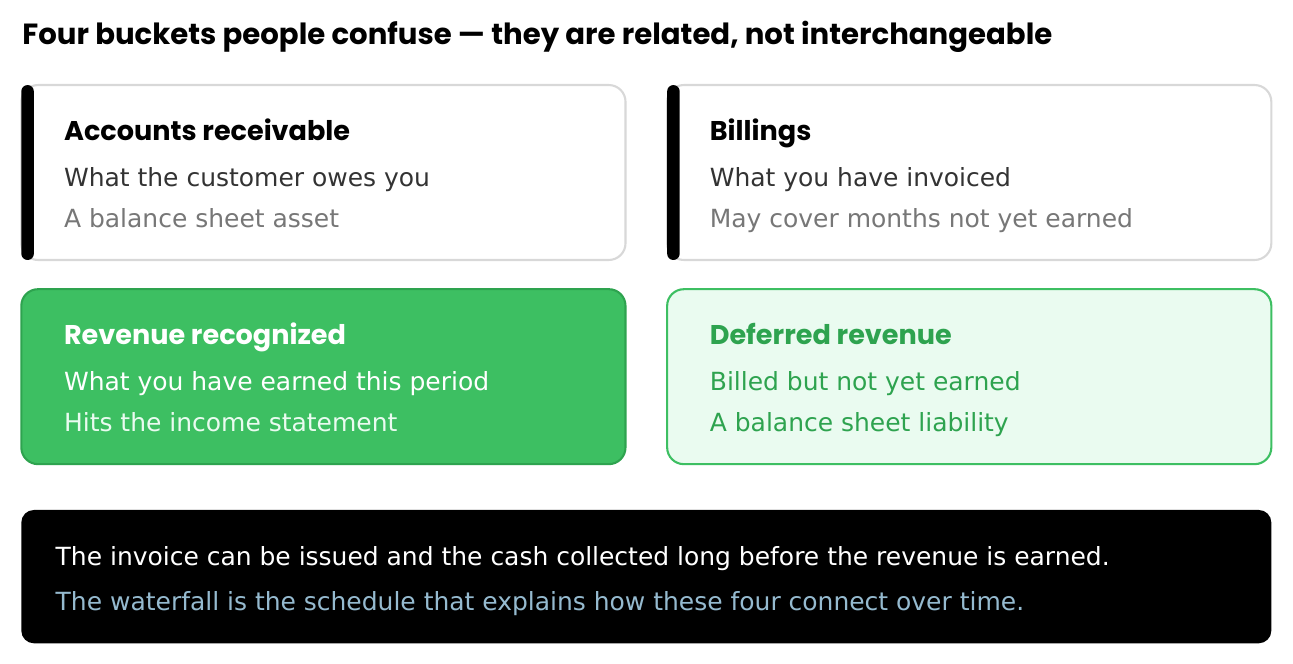
Keep these four straight, and the rest of the waterfall follows naturally. Blur them together, and the deferred balance stops tying to anything.
How Deferred Revenue Is Created
Most accounting systems automatically record revenue when an invoice is issued. So when the customer signs that $12,000 annual contract, the system books:
Dr Accounts Receivable $12,000 | Cr Revenue $12,000
The accounting system believes the work is complete. The controller knows otherwise — there are twelve months of service still to deliver, so revenue has to be deferred. At month-end:
Dr Revenue $11,000 | Cr Deferred Revenue $11,000
After that adjustment, current-month revenue is $1,000 and the deferred revenue balance is $11,000. The financial statements now reflect economic reality rather than billing activity.
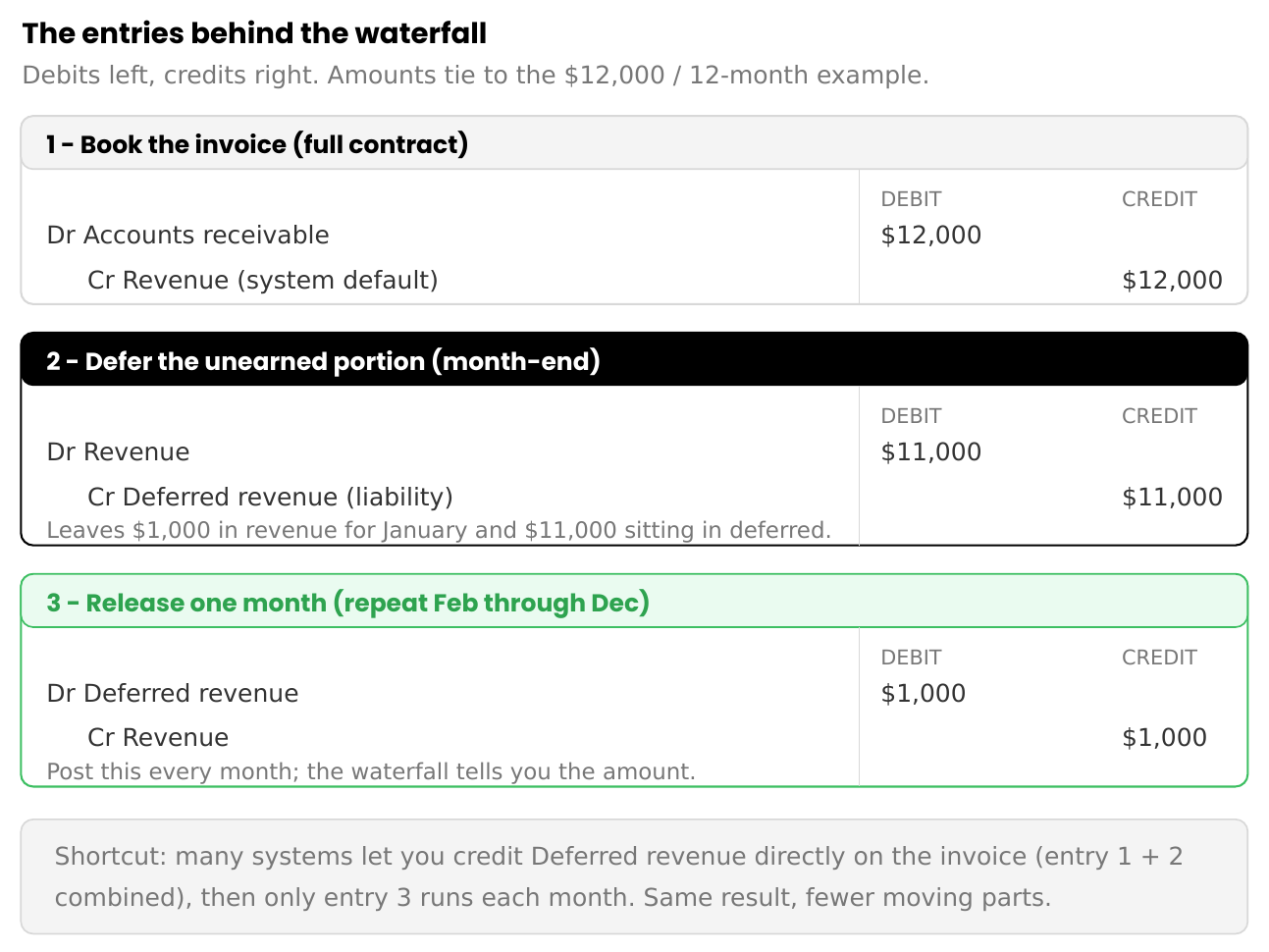
A quick note on the method: the example above books the full invoice amount to revenue and then reverses the unearned portion. Many systems instead let you credit deferred revenue directly on the invoice, so the unearned amount never touches revenue in the first place. Both arrive at the same place — pick whichever aligns with how your system and policy work, and apply it consistently.
The Waterfall Itself
As each month passes, a portion of deferred revenue becomes earned. The waterfall is simply the schedule that lays this out month by month.
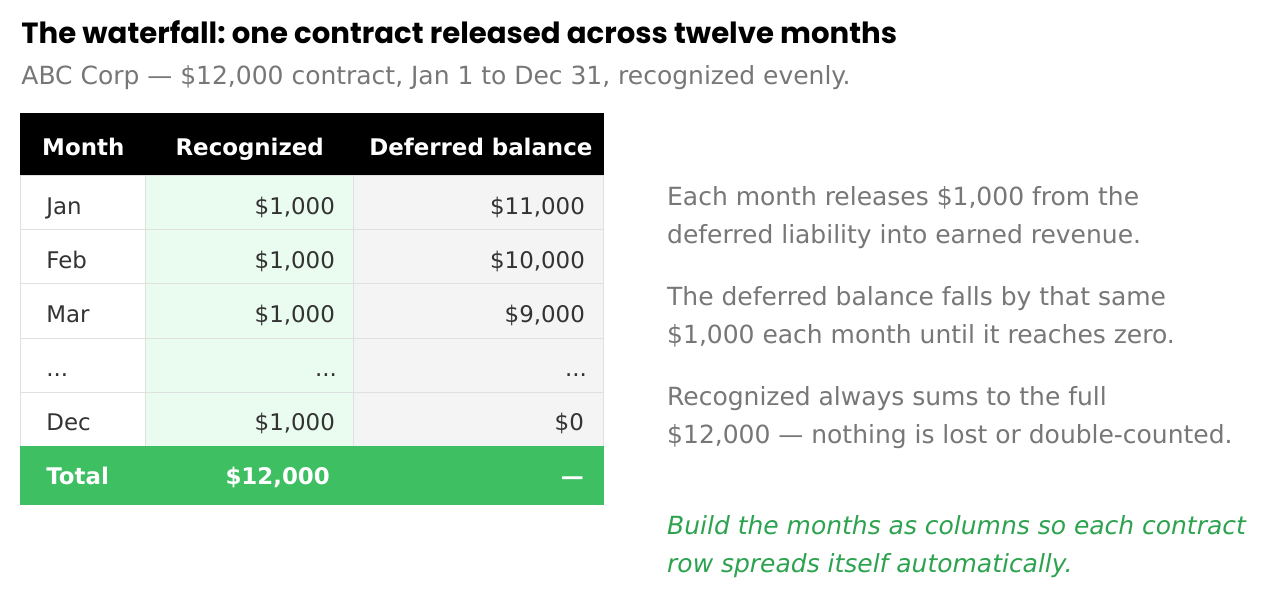
Each month receives its share of revenue, the deferred balance steps down by the same amount, and the total stays fully allocated — nothing is lost, and nothing is double-counted. The release entry each month is the mirror of the deferral:
Dr Deferred Revenue $1,000 | Cr Revenue $1,000
Repeat until the contract expires. The waterfall determines exactly how much revenue belongs in each period; the general ledger reflects the result.
Build Your First Workbook: A Step-by-Step Walkthrough
Reading about a waterfall is one thing. Building your first one is another. Here's how to go about it, start to finish, using a workbook with three tabs that feed each other — so the numbers flow automatically and nothing is retyped by hand.
To make it concrete, we'll use six invoices with different start dates and term lengths, the kind of mixed bag a real period actually looks like.
Step 1 — Review the period's invoices
Before anything goes into a spreadsheet, review the invoice details for the period. Confirm every invoice is correct — even the ones already paid. This is where you catch the things that quietly break a waterfall later: upgrades, downgrades, cancellations, credits, and contract date ranges that don't look right. Anything that needs secondary approval is resolved here before it enters the workbook. Clean inputs are the whole game; a waterfall built on unreviewed invoices just spreads the errors neatly across twelve months.
Step 2 — Export the invoices into the workbook
Pull the period's invoices from your billing or accounting system into the first tab. Export the fields the waterfall will need: invoice reference, customer, amount, contract start, and term. Resist the urge to type these in by hand — exporting preserves the audit trail back to the source.
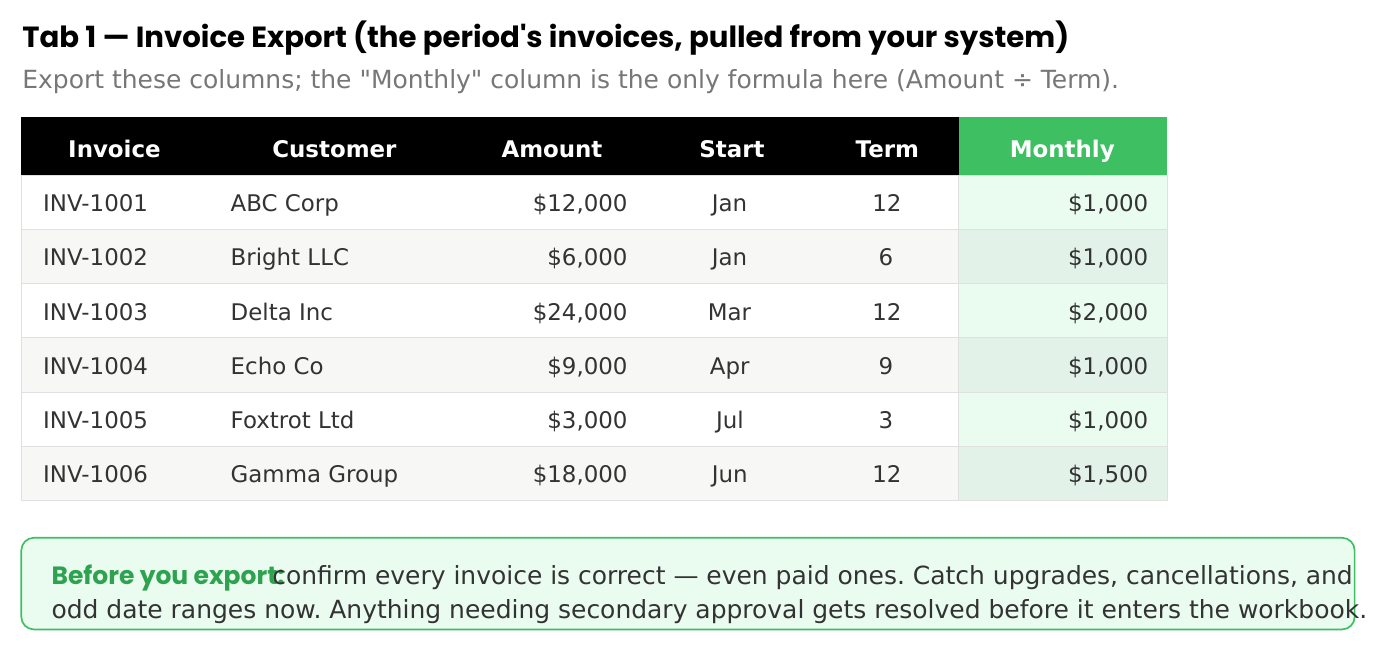
The only formula on this tab is the monthly amount: contract value divided by term. Everything else is exported data.
Step 3 — Create the waterfall tab
On a second tab, lay out the waterfall: one row per invoice, with the twelve months of the year as columns running across. This schedule shows how each contract's revenue spreads over its life.
Step 4 — Let formulas spread the revenue
This is the step that separates a reliable waterfall from a fragile one. Each month, the cell should reference the export tab and calculate its own value — never typed in by hand. A single formula, copied across the whole grid, does all the work: it checks whether a given month falls inside that contract's window, and if it does, it drops in one month's revenue. If not, it leaves zero.

Because every cell pulls from the export tab, there's nothing to mistype, and if an invoice amount or date changes upstream, the whole waterfall updates itself. Notice how the monthly totals build as contracts stack and taper as short terms end — that staggered pattern is exactly why the formula matters and why hand-entry would be a nightmare.
Step 5 — Build the journal entry tab
The final tab turns the waterfall into something you can actually post. It references the waterfall to pull the recognized total for the period, then formats it into a standardized journal entry that the controller can copy straight into the general ledger.
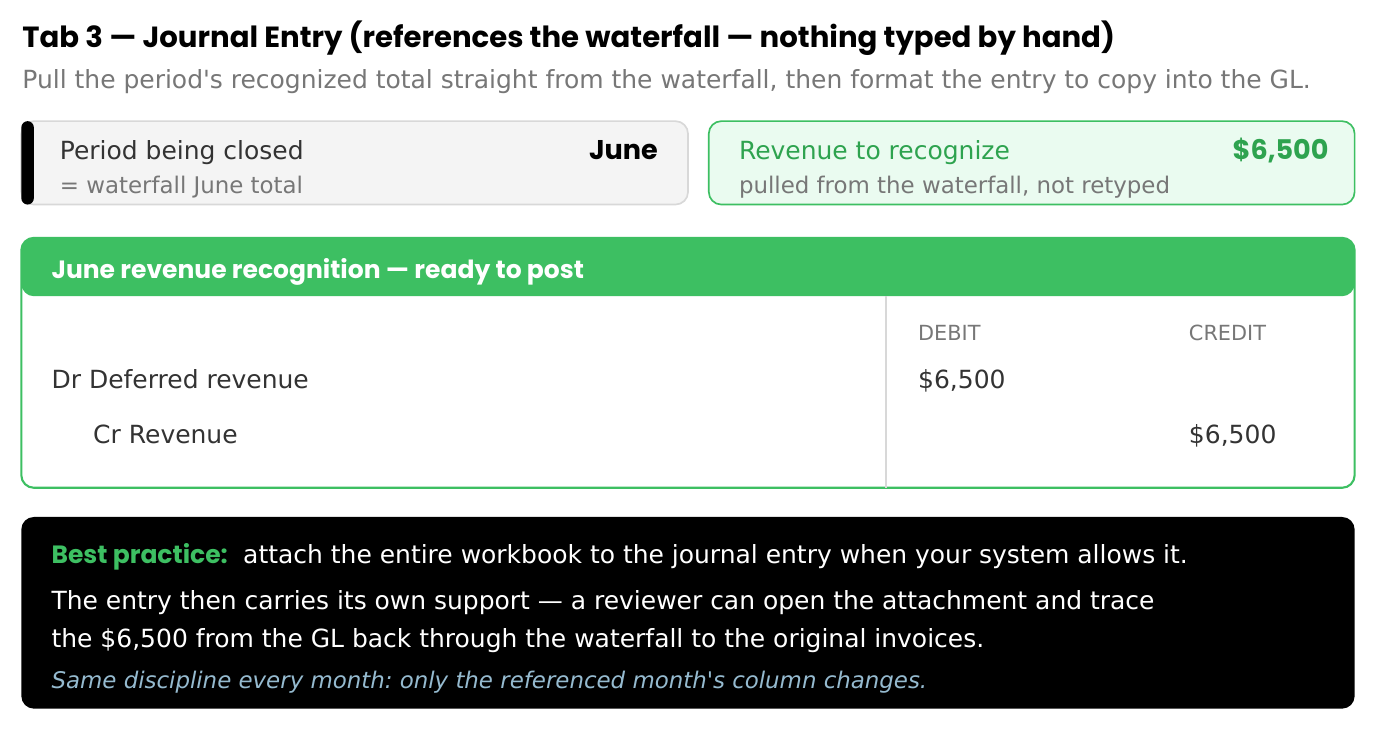
Because the entry references the waterfall, closing each month is the same motion every time: point the entry at the right month's column, and the figures assemble themselves.
One best practice worth building into your habit: when your system allows it, attach the entire workbook to the journal entry. The entry then carries its own support — a reviewer or auditor can open the attachment and trace the recognized amount from the general ledger, back through the waterfall, all the way to the original invoices, without sending you a single follow-up request. That traceability is what turns a spreadsheet into audit-ready support.
Why CFOs Love Waterfalls
A deferred revenue waterfall isn't only an accounting schedule. It's also one of the earliest forecasting tools a finance team has.
Every dollar already sitting in deferred revenue is revenue that will be recognized in future periods, assuming the service continues to be delivered. That means the schedule you built to support the close is also quietly telling you what next month looks like — and the month after that, and the rest of the year.
Look back at the waterfall grid. Before June even begins, the schedule already shows $6,500 of June revenue waiting to be recognized. Not a projection, not a sales forecast — revenue that's already been contracted and billed, sitting on the balance sheet, scheduled to land. Few accounting reports offer that kind of forward visibility straight out of the close process.
That's why CFOs and leadership teams become attached to these schedules. The waterfall lets them see committed revenue before the period opens, model what renewals and new bookings would add on top, and spot a softening quarter early — while there's still time to act. A schedule built for revenue recognition turns out to double as a window into the future. That dual purpose is a large part of why the waterfall earns its place as one of the most-reviewed reports in a recurring-revenue business.
Why Controllers Protect Closed Periods
One of the most common deferred revenue mistakes is repeatedly modifying historical schedules. A customer upgrades. A cancellation comes through. An invoice is corrected. A pricing adjustment surfaces. The temptation is to keep revising prior periods to make them "right."
Experienced controllers avoid this wherever possible. Closed periods should stay closed, and historical revenue should stay supported. Where an adjustment is warranted, it generally flows through future periods in accordance with company policy, rather than rewriting the past.
This preserves audit integrity and reduces reconciliation risk. A waterfall should tell a consistent story over time — not a story that quietly changes every time someone reopens the file.
Building a Reliable Waterfall
There's no universal deferred revenue template; every company tracks slightly different information. Common fields include customer name, invoice number, contract value, contract term, billing frequency, product line, renewal information, and customer segment. Some teams capture far more.
In practice, more detail is usually better — there is no such thing as too much support. No auditor should have to guess how a balance was calculated, and no future accountant should have to reverse-engineer the schedule. A good waterfall clearly answers four questions: what was billed, when it was billed, when it will be earned, and what remains deferred. Transparency reduces risk.
Best Practice: Import Data Whenever Possible
One of the most common maintenance mistakes is manually entering balances, which introduces unnecessary risk. Wherever you can, export invoice data, reference source reports, use formulas, automate the calculations, and preserve the audit trail.
A waterfall should reconcile with source documents and the general ledger. The less manual intervention required, the stronger — and more trustworthy — the schedule becomes.
Common Deferred Revenue Mistakes
Recognizing revenue when cash is received. Cash timing does not determine revenue timing.
Ignoring contract modifications. Upgrades, downgrades, cancellations, and credits each have to be evaluated carefully — they don't just disappear into the existing schedule.
Overwriting historical periods. Prior periods shouldn't be casually rewritten.
Losing reconciliation support. The deferred revenue balance on the balance sheet should always tie back to the waterfall.
Tracking too little detail. If another accountant can't follow the schedule six months later, it isn't detailed enough.
What the Waterfall Is Really For
Step back from the mechanics and a pattern emerges.
Accounting systems are excellent at one thing: recording invoices. They capture who was billed, for how much, and when, with precision. What they handle far less gracefully is the underlying question — how those invoices translate into earned revenue, dollar by dollar, month by month, as the service is actually delivered.
That gap is the entire reason the waterfall exists. It's the bridge between billed and earned — the schedule that holds the timing, the general ledger can't express on its own. The invoice is a single moment; the revenue is a twelve-month story, and something has to tell that story in a way that ties to the books and survives an audit.
For now, that something is usually a spreadsheet that a controller builds and maintains by hand. It works, but it lives outside the accounting system rather than inside it — which is exactly why it has to be reconciled, protected, and re-explained every close. The waterfall isn't a flaw in the controller's process. It's a workaround for something the software never quite learned to do.
Final Thoughts
Most controllers don't maintain a deferred revenue waterfall because they enjoy spreadsheets. They maintain it because the timing of revenue matters.
Customers may pay today. Invoices may go out today. Cash may arrive today. But the revenue may not be earned for months, and the waterfall exists to reconcile those timelines.
Maintained properly, it becomes far more than a revenue schedule. It's the source of truth connecting billings, collections, deferred revenue, and earned revenue. And during the month-end close, few schedules provide more confidence than knowing every dollar of revenue is recognized in the correct period.
No controller sets out wanting to maintain a waterfall. They build one because they need a way to explain revenue timing that the accounting system can't, and until the software learns to carry that timing itself, the spreadsheet is the answer that fills the gap.
But the spreadsheet was always the means, not the point. The point is revenue recognized in the period it was actually earned — and a waterfall that lets a controller prove it, to a CFO, an auditor, or a lender, without flinching.
