


How to Create a Construction Work in Progress (WIP) Schedule
.png)
Construction projects rarely begin and end within the same accounting period.
A contractor might mobilize in January, build through the spring and summer, push construction into the following year, and not fully wrap the project for eighteen months.
That creates a problem: revenue and profit can't simply be recognized when cash arrives.
If accounting followed cash receipts alone, the financial statements would swing wildly from month to month and never reflect the actual progress of the work. A quiet billing month would look like a loss; a big draw would look like a windfall. Neither would be true.
That is why construction companies use a Work in Progress (WIP) schedule.
A WIP schedule helps management, lenders, bonding companies, insurance agents, external accountants, and auditors understand how much work has been completed, how much revenue has been earned, how much profit has been generated, and whether billings are keeping pace with the work performed.
For many construction companies, it becomes one of the most important reports the accounting department produces.
What Is a WIP Schedule?
A Work in Progress schedule is a project-by-project report that measures contract value, costs incurred, estimated total project costs, percentage complete, revenue earned, billings to date, over-billings, under-billings, and project profitability.
It serves two purposes at once. First, it supports GAAP-compliant revenue recognition. Second, it gives management real visibility into project performance and cash flow.
Experienced controllers know the WIP is far more than an accounting report. It is a management report.
Who Uses a WIP Schedule?
Plenty of people outside the accounting department lean on this report.
Company leadership uses it to evaluate project profitability, gross margin performance, budget overruns, future cash needs, and backlog health.
Bankers frequently require WIP schedules as part of quarterly covenant reporting, using them to assess revenue quality, working capital, and contract asset and liability balances.
Bonding companies request WIP schedules when evaluating bonding capacity, looking at project execution, margin performance, exposure levels, and overall contractor stability.
Insurance providers may request WIP information to understand project volume and operational exposure.
Auditors and tax professionals use the schedule to validate revenue recognition and evaluate project performance throughout the year.
The Foundation of WIP Reporting
Every WIP schedule begins with three numbers.
The first is contract value — the total amount expected to be earned from the project. In our running example, that's $2,000,000.
The second is costs incurred to date — all direct project costs incurred since the project began. Here, $800,000.
The third is estimated total cost at completion — management's best estimate of what the project will cost when it's finished. Here, $1,600,000.
A common point of confusion: estimated total cost is its own independent number, not contract value minus costs. It's what the job is expected to cost ($1,600,000), which is different from what it will be paid ($2,000,000). The gap between them — $400,000 — is the project's expected total profit, not a cost figure. Keep the two straight and the rest of the schedule falls into place.
These three figures are the engine. Everything else on the schedule is calculated from them.
Here is what that looks like as an actual report. The three columns you enter are on top; the columns the spreadsheet calculates are below, with the formula behind each one spelled out.
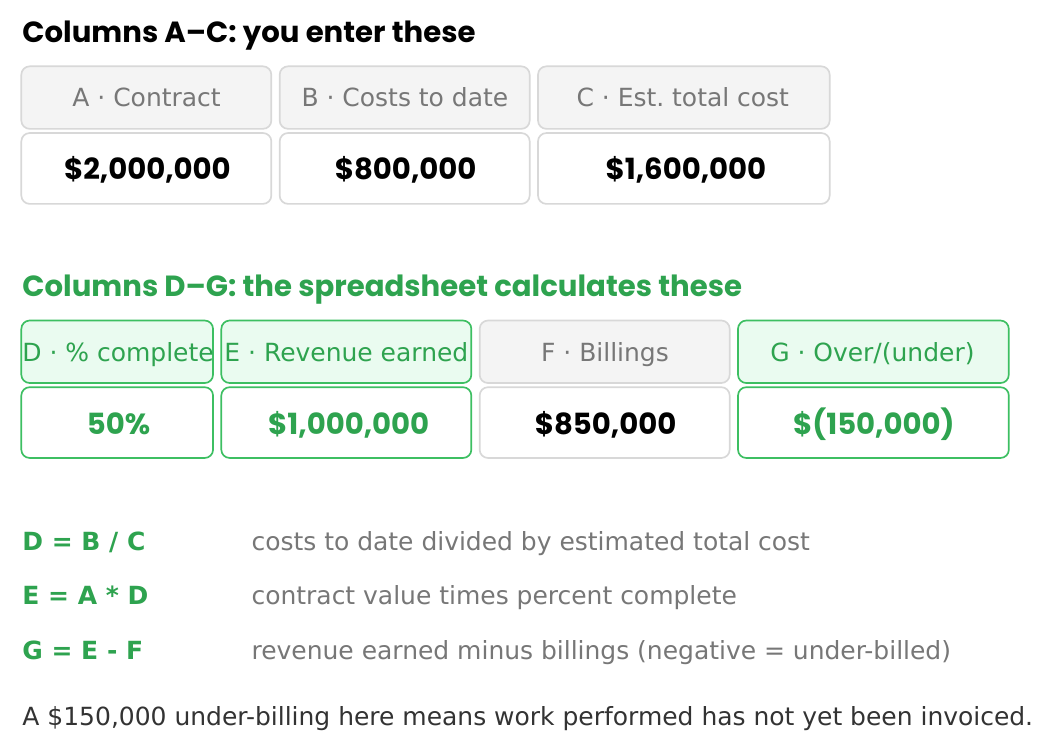
Notice that you only ever type three numbers per project. Percent complete, revenue earned, and the over/under billing position are all formulas. Build the columns once, and every project row calculates itself.
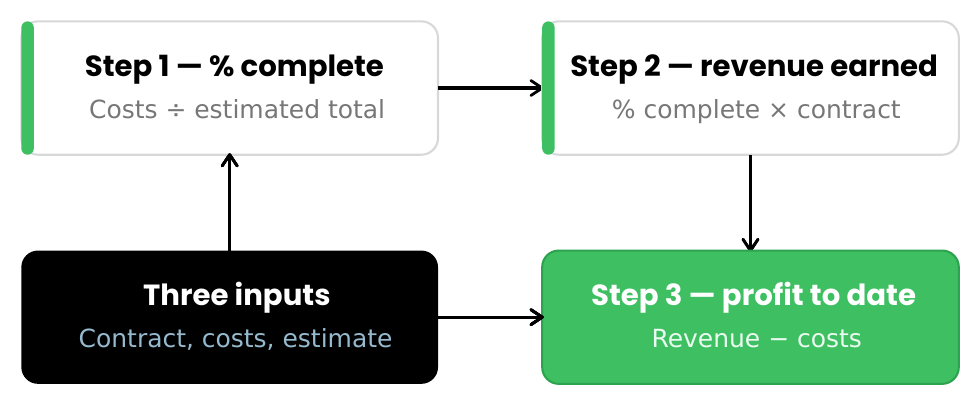
Step 1: Calculate Percentage Complete
Percentage complete measures how much of the project is done, based on costs incurred relative to the total expected cost.
Percentage complete = Costs incurred to date ÷ Estimated total cost at completion
This is always a cost-to-cost ratio — costs spent against costs expected. Contract value plays no part in it.
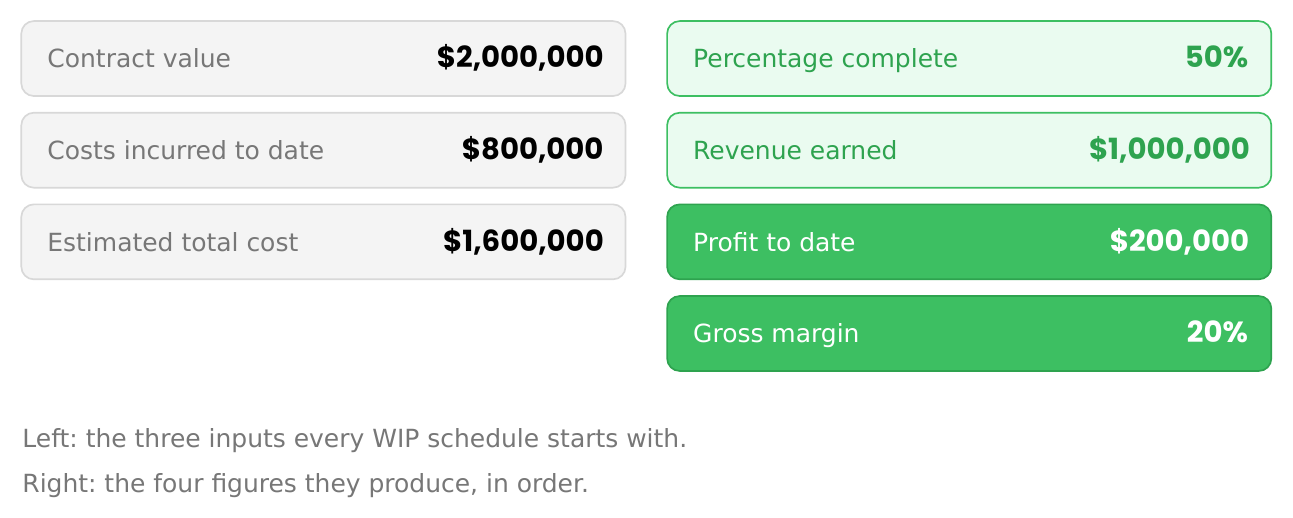
With $800,000 in costs against a $1,600,000 estimate, the project is 50% complete. Management believes half the work is done.
Step 2: Calculate Revenue Earned
Once the percentage complete is known, revenue can be recognized in proportion to the work performed.
Revenue earned = Contract value × Percentage complete
A $2,000,000 contract, 50% complete, has earned $1,000,000 in revenue. The project isn't finished, but half the work has been performed, so half the contract value has been earned.
Step 3: Calculate Project-To-Date Profit
Profitability is one of the most important outputs of a WIP schedule.
Profit to date = Revenue earned − Costs incurred to date
With $1,000,000 earned against $800,000 in costs, the project shows $200,000 in gross profit — a 20% gross margin.
Because so many projects span multiple years, project-to-date reporting is what tells the real story. Looking at a single month's activity rarely does.
Building Your First WIP Schedule
A basic WIP report should include, at a minimum, these columns: Project, Contract Value, Costs Incurred, Estimated Cost, % Complete, and Revenue Earned.
As the company grows, you'll layer more on top. The sections below build that complexity one level at a time.
Level Two: Add Billings
Most contractors invoice customers before a project is fully complete, which creates a timing gap between revenue earned and revenue billed.
To capture it, add two columns: Billings to Date, and Over/(Under) Billing.
Over/(Under) billing = Revenue earned − Billings to date
This single calculation tells you whether you've billed ahead of the work or fallen behind it — and that distinction drives the balance sheet.
Understanding Underbillings
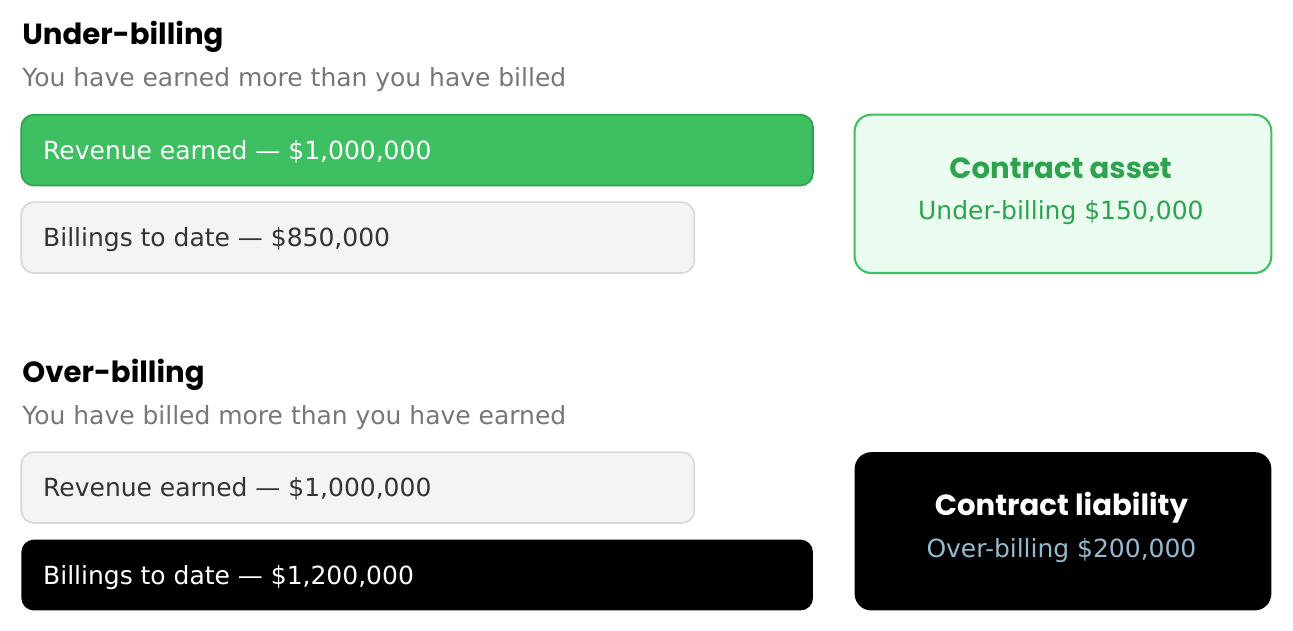
Underbilling occurs when revenue earned exceeds billings to date.
If you've earned $1,000,000 but only billed $850,000, you're under-billed by $150,000 — you've performed work you haven't invoiced yet.
Underbillings are generally presented as a contract asset on the balance sheet. The common journal entry is a debit to Contract Asset (underbilling) and a credit to Revenue.
Understanding Overbillings
Overbilling is the mirror image: billings to date exceed revenue earned.
If you've billed $1,200,000 but only earned $1,000,000, you're over-billed by $200,000 — you've billed for work not yet performed.
Overbillings are generally presented as a contract liability on the balance sheet. The common journal entry is a debit to Revenue and a credit to Contract Liability (overbilling).
The Journal Entries You Actually Post
This is where the WIP schedule stops being a report and becomes accounting. The numbers above don't do anything until they're posted to the general ledger. There are really only three entries to understand, and they all flow directly from the columns you just built.
A key point first: your job costs are already in the books. As crews are paid, materials are bought, and subcontractors are invoiced, those costs hit the ledger in real time. So the WIP entries are not about recording costs — they're about catching revenue up to the work performed, and then squaring your billing position on the balance sheet.
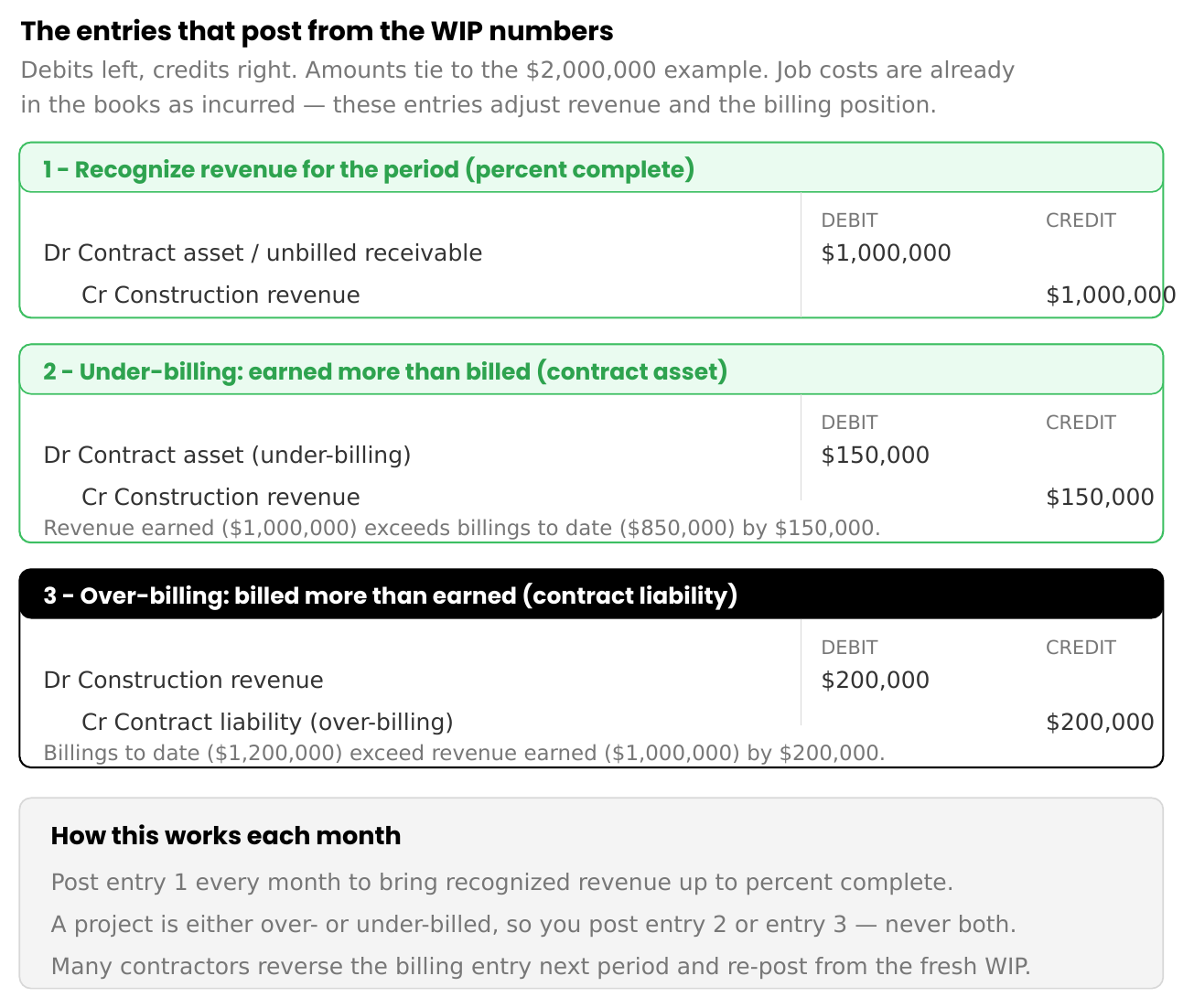
The first entry recognizes revenue in proportion to the percentage complete. You post it every month, for every active project, so recognized revenue always reflects the work actually done.
The second and third entries handle the billing position, and a single project only ever needs one of them. If you've earned more than you've billed, you post the under-billing entry, and a contract asset appears. If you've billed more than you've earned, you post the over-billing entry, and a contract liability appears. Many contractors reverse whichever billing entry they posted at the start of the next period and repost from the fresh WIP, so the balance sheet position is always current rather than cumulative.
That's the whole cycle. Build the schedule, recognize revenue to percent complete, then book the over- or under-billing. Everything a controller posts for construction revenue lives in those three entries.
Why the Balance Sheet Matters
Many accountants focus almost entirely on the income statement. Experienced construction controllers know WIP reporting matters just as much for the balance sheet.
A poorly managed WIP schedule can distort contract assets, contract liabilities, working capital, the current ratio, and debt covenants.
The balance sheet tells lenders and bonding companies whether the company is financially healthy — and the WIP schedule often serves as the bridge between project activity and balance-sheet accuracy.
Level Three: Add Retainage
As projects get larger, retainage tracking becomes increasingly important.
Retainage is the earned amount a customer withholds until project milestones are met. Many contractors separate it from standard accounts receivable, adding columns for Accounts Receivable, Retainage Receivable, and Total Exposure.
That visibility helps management see outstanding collections, customer exposure, and cash-flow timing. Retainage is often one of the largest assets on a contractor's balance sheet, and ignoring it can hide meaningful working-capital risk.
This is also the point at which the multi-year nature of construction appears in the report. Because a job can span two or three fiscal years, a mature WIP splits project-to-date figures into what was earned in prior years, what's been earned to date in the current year, and what's left to complete. Only the current-year movement belongs on this year's income statement and tax return — so the split is what keeps both correct.
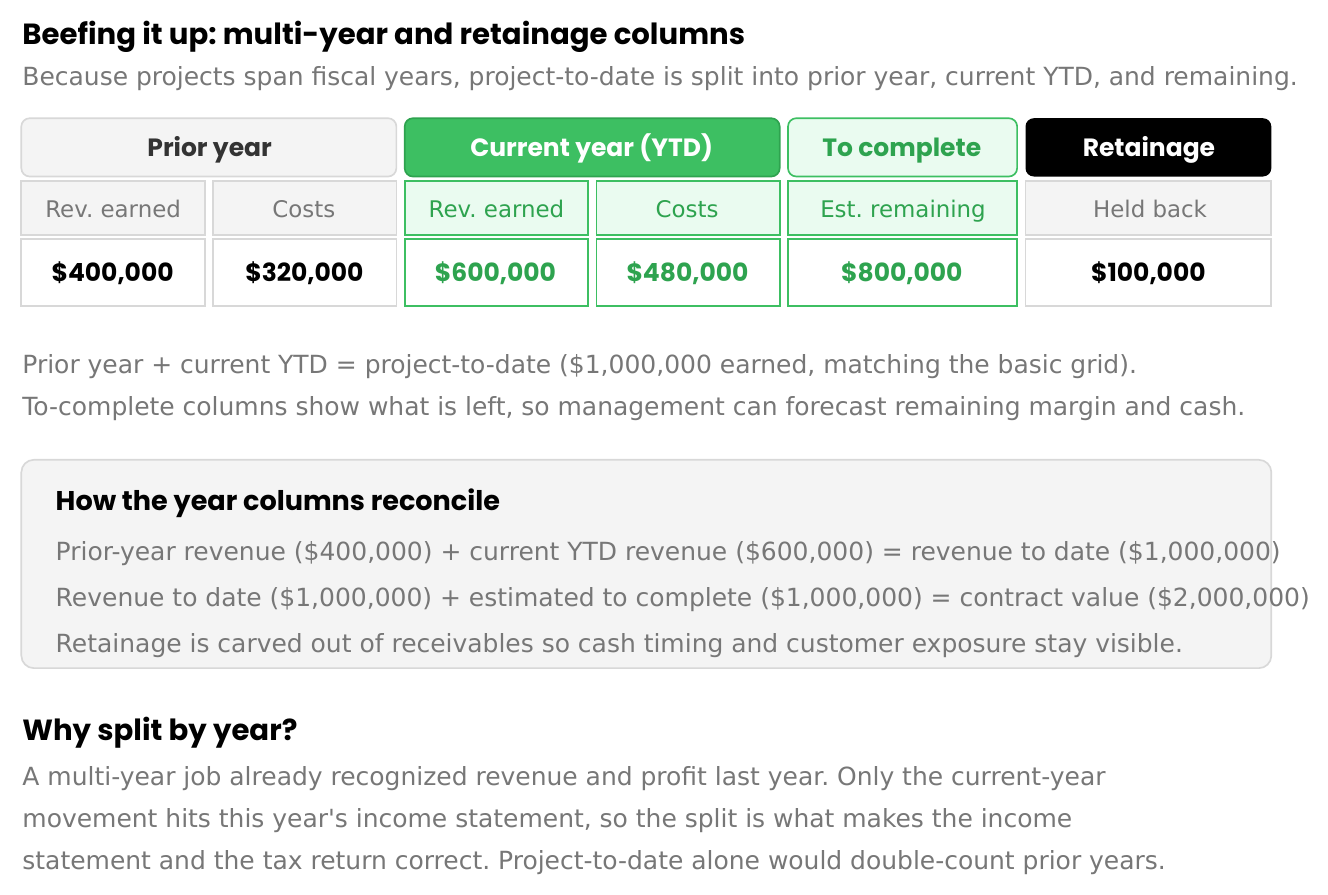
The reconciliation is the part worth internalizing: prior-year revenue plus current-year-to-date revenue equals revenue to date, and revenue to date plus estimated cost to complete equals the full contract value. Get those two checks to tie, and the schedule holds together.
Level Four: Add Working Capital Visibility
A mature WIP schedule often layers in Accounts Receivable, Retainage, Accounts Payable, and a Net Working Capital Impact column.
At this stage, the WIP evolves from an accounting report into an executive reporting tool. Management can quickly spot cash-flow concerns, vendor pressure, collection issues, and financing needs. The report becomes valuable well beyond accounting.
Common WIP Reporting Mistakes
Using outdated cost estimates. A WIP schedule is only as accurate as the estimated total cost. Stale estimates produce wrong revenue.
Ignoring change orders. Approved change orders should be reflected in contract values. Skip them, and your margins go sideways.
Focusing only on revenue. Profitability matters as much as revenue. A growing contractor can add revenue while quietly destroying margins.
Forgetting the balance sheet. Over- and under-billing directly affect working capital and lender reporting. They deserve careful review every month.
Treating WIP as a year-end exercise. The strongest contractors update WIP schedules monthly. Waiting until year-end turns small variances into year-end surprises.
Final Thoughts
Many people believe the purpose of a WIP schedule is revenue recognition.
Experienced construction controllers know its real purpose is visibility — into project profitability, cash flow, working capital, and risk.
Maintained properly, a WIP schedule becomes one of the most valuable reports in the organization. It helps management make better decisions, supports the accuracy of financial statements, strengthens lender relationships, and provides real confidence that projects are performing as expected.
For construction companies operating under accrual accounting, the WIP schedule isn't simply another spreadsheet.
It is the financial story of every project the company performs.
